
Recently I met with a financial services firm, and the founding partner opened the call with a question I hear all the time: “What is an agent?”
My answer: An agent is an AI that has the ability to make decisions without you — it’s autonomous, it has agency — and it’s not based on rules or simple automation. But even that definition gets complicated fast.
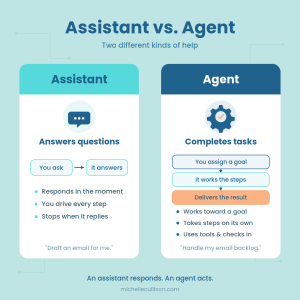 For example, as of June 2026, open Microsoft 365 Copilot and you’ll find a section labeled “Agents” right in the sidebar. But look at what lives there: things like a “Marketing Copywriter Assistant” or an “Operations Writer.” These are saved sets of instructions, prompts, and files you can reuse. Helpful? Absolutely. Autonomous? Not at all. Microsoft calls them agents, but they don’t make decisions on their own — they wait for you to prompt them, every time.
And here’s where it gets even more confusing: that same month, Microsoft also began rolling out genuinely autonomous agents for enterprise plans — AI that can carry out multi-step tasks on your behalf without being prompted at each step. So the same word, “agent,” now covers both: a reusable prompt sitting in your sidebar and an autonomous system doing real work while you’re away. That’s exactly why the question “what is an agent?” is so hard to answer right now. The label alone doesn’t tell you which one you’re getting. Learn more about Microsoft’s Spring 2026 Update.
That distinction matters, because most business owners do not need to start with agents. They need to understand prompts first. A prompt is simply the instruction you give the AI. Good prompts create better outputs, better consistency, and less rework. But prompts are only part of the equation.
To get results that are truly useful — not just transactional (think copy and paste to and from ChatGPT) — AI also needs good context and good data.
The more clearly you tell AI what the task is, what source material to use (the data), what kind of outcome you’re looking for, what expertise you need, and what audience you work with, the better the output becomes.
Here’s the practical takeaway:
- Use prompts to make AI do repeatable work.
- Use assistants to organize and reuse those prompts.
- Use automation when the workflow is stable and predictable.
- Use true agents only when you need more independent decision-making, and when the risk is acceptable.
For most busy business owners, the best first step is not building an agent. It’s learning how to write prompts with the right context and data so the AI can produce useful, reliable results.
Take one repetitive task from your list this week and write one prompt for it.
Ask yourself: what would I tell a new employee who’s never done this before? What do they need to know? What files do they need access to? (That’s the data!) And who will see the result? That’s your context and that’s what makes AI actually useful.
If you can improve the prompt, the context, and the data, you can improve the workflow. That’s the foundation everything else builds on.
Want to see where this leads? AI Bootcamp for Busy Professionals walks you through it in six modules — AI Foundations, AI Assistant, AI Media, AI Embedded, AI Agents, and AI Automation — at your pace, around your workflow. Notice where Agents appear on the roadmap. That’s intentional: you build the foundation first.
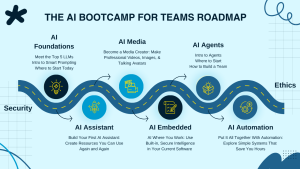
Members routinely turn 5-hour tasks into 30-minute ones and that starts in Module 1.
Join AI Bootcamp for Busy Professionals →
Put AI to work this week, not someday,
Michelle Cullison
AI Speaker | AI Training & Consulting