
If you have copied an email, meeting note, rough idea, or document into ChatGPT and asked for help, you are not using AI the wrong way. That is how most people begin.
But there is an important difference between using AI as a helpful chat tool and using technology to build operational capacity in your business.
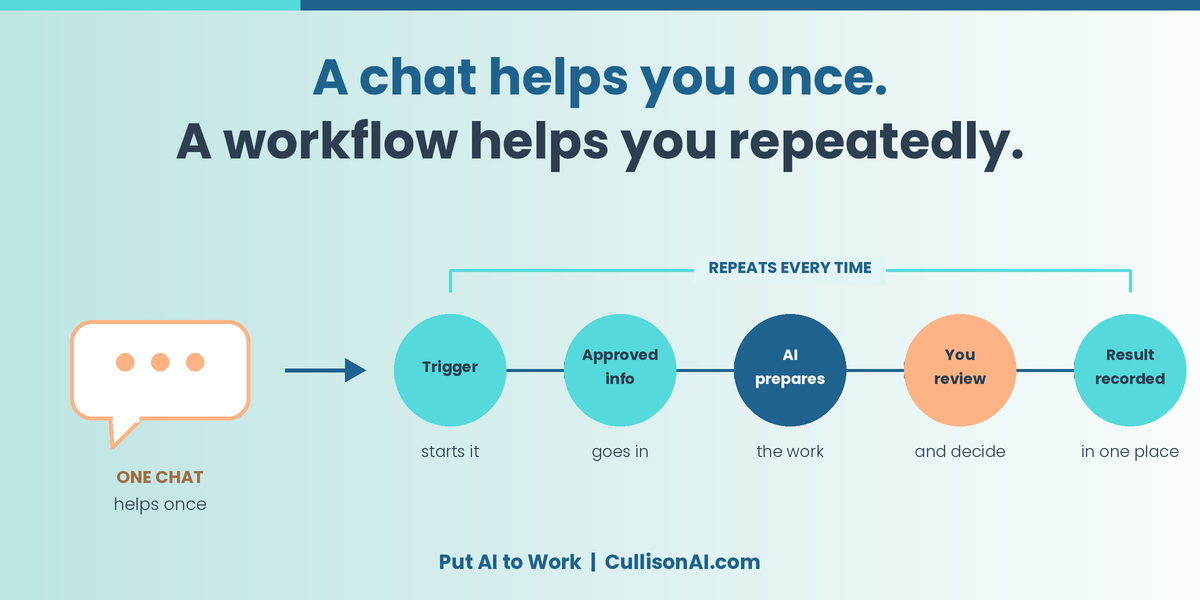
A chat can help someone complete a task once. A reusable workflow can help a person or team handle recurring work with more consistency, less administrative effort, and fewer handoffs.
Not every better workflow requires generative AI in every step.
Some repeated tasks are best handled through straightforward automation: approved information moves from one system to another according to clearly defined rules. AI can help you design the process, prepare or interpret information, handle variable inputs, and support review. But when the work is structured and predictable, the best solution may simply be reliable automation.
Copy-and-paste has a ceiling
AI chat often depends on someone remembering to use it at the right moment.
One person may have a useful prompt saved somewhere. Another may use different instructions. Important business information may be copied into multiple places. Results may not be saved where the rest of the team can find or use them. And when the person who knows the “AI trick” is busy, out of the office, or leaves the organization, the process may disappear with them.
The next stage of AI adoption is not necessarily buying another tool or attempting to automate everything.
It is choosing one repeated task and making the process reusable.
That means defining:
-
What starts the work
-
What approved information the task needs
-
What the system, automation, or AI should do
-
What a person must review or decide
-
Where the final result should be recorded
A real example: scheduling Zoom training sessions
Here is a simple example from our own work.
When we set up a multi-session training series, each Zoom session needs the same basic information:
-
Course title
-
Session description
-
Date and time
-
Instructor
-
Registration settings
The manual process used to look like this:
-
Open Zoom.
-
Create a meeting.
-
Enter the title, date, time, instructor, and description.
-
Turn on registration.
-
Copy the registration link.
-
Paste that link into the document or spreadsheet shared with the client.
-
Repeat the process for every session.
None of those steps required strategy, judgment, or creativity. They were repeated administrative actions: moving approved information from one place to another.
So we changed the workflow.
This is primarily a workflow automation, not an AI system making decisions. AI helped us think through and implement the process more easily, but the finished workflow follows clear rules.
The approved course information now lives in a spreadsheet that serves as the control center. Once the information is reviewed, the workflow creates the Zoom meeting and returns the registration link to the appropriate row in the spreadsheet.
A team member can then review the result, confirm that the registration link works, and share the completed information with the client.
For a 10-session program, that changed a task that could take about five minutes per session—roughly 50 minutes total—into a workflow that can run in seconds once it has been configured and approved.
More importantly, it removed a repetitive administrative burden without automating an important business decision.
What makes this a workflow?
Let’s step back from Zoom scheduling and look at the structure. You may not use Zoom, but you likely have similar administrative tasks in your business.
That is the difference between simply using an AI chat tool and building a process that can handle more work repeatedly.
The automation does not need to make every decision. In fact, the best workflows often keep approval, judgment, exceptions, and client-facing decisions with a person.
Start with one repeated task
You may not need to automate anything as involved as Zoom scheduling. Your first workflow may still involve some copying and pasting. That is fine.
The question is whether you can make the work more efficient, repeatable, and easier for someone else to follow.
Ask yourself:
-
Can the work start from approved information rather than recreating the context every time?
-
Can you save the instructions, examples, and quality standards so the task does not begin from zero?
-
What part of the work is best handled by a person, AI, or straightforward automation?
-
Can someone review the output before it is shared externally?
-
Can the final result be recorded in the system your team already uses?
-
Can you measure whether the process saves time, reduces errors, speeds follow-up, or reduces owner involvement?
For example, a meeting-summary workflow could begin with a Zoom, Microsoft Teams, or Google Meet transcript. Built-in AI could prepare a draft summary of decisions, action items, owners, and due dates. The meeting leader could verify the summary, and the approved tasks could then be recorded in the team’s task-management or project-management system.
The summary itself is the easy part. The larger value comes from documenting commitments, assigning ownership, and following through.
Choose the technology closest to the data
When you are ready to improve a workflow, begin with the systems and information your organization already uses.
If work begins in Zoom, your calendar, Google Workspace, Microsoft 365, a CRM, a scheduling system, or shared documents, first look at the approved AI and automation capabilities in that environment—or at secure, approved integrations that connect to it.
This approach can:
-
Reduce unnecessary copying and pasting
-
Preserve useful business context
-
Make the process easier for others to understand and follow
-
Keep business information within the tools your organization has approved
-
Create a clearer record of what happened and where the final result lives
The Zoom workflow works because the information has a clear home: the spreadsheet. Once the meeting is created, the registration link returns to that same location for review and use.
A good workflow does not scatter information. It moves approved information through a defined process and returns the finished result to a system the team can find later.
A simple challenge
This week, identify one task you repeat often enough to deserve a better process.
Ask:
-
What triggers the work?
-
What approved information does it need every time?
-
Where does that information already live?
-
Which parts require human judgment?
-
Which parts could be handled by AI or straightforward automation?
-
What must a person still review or decide?
-
Where should the final result be recorded?
-
How will you know whether the workflow saved time, reduced errors, or improved follow-through?
That is how you begin moving from an occasional AI chat to a reusable system that gives your business more capacity.
Keep using AI chat when it helps. But when you find yourself repeating the same copy-and-paste task week after week, ask whether it is time to turn that task into a workflow—one that uses people, AI, and automation appropriately to free your team for higher-value work.
Transparency note: This article was developed from ideas and examples used in two of my training sessions. I used Perplexity for editorial support, then reviewed, edited, and finalized the piece myself.